
let's break it down“There’s no one logo file format that works perfectly for everything, and while you don’t need to be an expert on them all, understanding the basics will save you a lot of confusion (and potentially money) when it comes to using them.”
Let’s set the scene: you've just invested in a shiny new brand identity with me, I've handed over all your beautiful new logo files and you're ready to start putting them to work.
You open your final branding folder and suddenly you're bombarded with what feels like 47 different versions of the exact same logo, all with different file extensions, colour formats and names that mean absolutely nothing to you.
EPS? SVG? CMYK? HUH?
I promise there's a method to the madness, and it’s not as scary as it looks.
When I hand over a branding project, I provide your logo files in a range of different formats, because unfortunately there's no such thing as one magical logo file that works perfectly for absolutely everything.
And while you don't need to become a graphic designer overnight to put them to good use, understanding the basics will save you a whole lot of confusion (and potentially some very expensive printing mistakes) down the track.
So, here's my little cheat sheet to help you understand exactly what all those files are, and when you should be using them.
First things first: Digital vs Print (or RGB vs CMYK as we designers like to call it)
Before we even get into the different file types, we need to talk about colour.
You might notice that your logo files are separated into folders labelled RGB and CMYK (I know what you’re thinking, enough with the acronyms).
They actually stand for two different colour systems, designed for two very different purposes. Let’s break it down.
RGB — for digital use only
RGB stands for Red, Green and Blue, and it's the colour system used by digital screens. Think websites, social media, email signatures, digital presentations and pretty much anything else that's going to be viewed on a screen.
RGB uses light to create colour, which means it can produce some beautifully bright and vibrant shades that simply aren't achievable through traditional printing (especially blues, RIP).
CMYK — for print use only
CMYK stands for Cyan, Magenta, Yellow and Key (Black), and it's the colour system commonly used in commercial printing. You might recognise this one by the cartridges that go into a printer.
CMYK is used for all print applications on paper (or similar mediums). Think business cards, brochures, signage, packaging and other printed marketing materials.
Unlike RGB, CMYK uses ink rather than light to reproduce colours, which means some of those super vibrant colours you see on your screen can look a little different once they're printed.
You can have a beautifully vibrant poster or logo on your screen, but if it’s not formatted in the correct colour mode, you could end up with disaster once you go to print. The main thing to remember is always use your RGB files for digital applications and your CMYK files for print wherever the format and supplier support it. And if you're sending your logo off to a printer, always check their preferred file specifications first.
File Format 1: EPS – the one your printer will probably ask for
If you've ever had a signwriter, printer or merchandise supplier ask you to send through a vector version of your logo, this is probably what they're talking about.
An EPS (Encapsulated PostScript) file is a format commonly used in professional design and print production, and the EPS logo files I provide are vector-based.
Why does my logo need to be a vector, you may ask? The main reason is so they can be scaled up or down without losing quality. A true vector logo can go from the size of a postage stamp to the side of a building without turning into a blurry, pixelated mess.
Pretty neat, right?
EPS files are generally best suited to professional printing, signage, embroidery, promotional merchandise and other applications where a supplier needs to work with your original logo artwork. They can also be useful for digital applications, which is why I provide all EPS logos in both RGB and CMYK formats.
You might not ever open these files yourself (you might not even be able to, but your printer will). You’ll just want to keep them somewhere safe for when a supplier inevitably asks for one.
File Format 2: SVG – the digital all-rounder
SVG stands for Scalable Vector Graphics, and it's another vector format, which means it can also be resized without losing quality. They’re particularly useful for digital applications – similar to the EPS format – but usually a lot more accessible across web-based platforms.
They're one of my favourite formats for websites because they keep logos looking beautifully crisp across different screen sizes and resolutions, without needing an enormous image file.
SVGs can also support transparent backgrounds, making them incredibly versatile when you're working with different website sections, backgrounds and layouts.
One thing to keep in mind is that not every platform or application supports SVG or EPS uploads, so if you run into issues, your PNG files will usually be the next best option.
File Format 3: PNG – your everyday use bestie
If there's one logo format you're probably going to reach for more than any other, it's this one.
PNG (Portable Network Graphics) files are incredibly versatile and, most importantly, they support transparent backgrounds across all digital applications.
That means you can place your logo over a photograph, coloured background or graphic without having an awkward white rectangle sitting behind it.
You'll probably find yourself using PNGs for everything from social media graphics and Canva templates to email signatures, presentations and other everyday marketing materials.
The catch? Unlike EPS and SVG files, PNGs are raster images, which means they're made up of pixels. So they can look fantastic at their intended size, but if you try to enlarge a PNG too much, you'll eventually start losing quality.
Luckily, I provide all my PNG logos in a high-resolution format, so you should never have this issue applying it across any digital applications!
File Format 4: JPG – your last resort
And finally, we have the humble JPG (or JPEG, if we're being formal).
JPG files are probably the most familiar format on this list because they're used for just about everything, particularly photographs and images.
They're easy to open, easy to share and supported by practically every device and platform imaginable.
But there's one important limitation when it comes to logos: JPGs don't support transparent backgrounds.
So, if I provide your logo as a JPG, it'll have a solid background rather than allowing whatever's behind it to show through.
JPGs also use lossy compression, which means image quality can deteriorate when files are repeatedly saved or heavily compressed.
They're perfectly useful for certain applications – such as social media profile pictures, but generally wouldn't be my first choice for an application. In fact, I would only recommend using them if all the other formats above are not suitable.
A side note on “AI”
Not so common, and not something I provide, but sometimes you may receive a logo or design asset in .AI format.
I just want to clarify on behalf of all my fellow designers out there: this file type does not stand for AI as in Artificial Intelligence.
It stands for Adobe Illustrator – the industry standard software for designing scalable vector logos and graphics.
So if you ever see an .AI file amongst any assets you’ve received from a designer, I assure you it does not mean your assets were made with AI.
It’s simply an unlucky coincidence.
So, which logo file should you actually use?
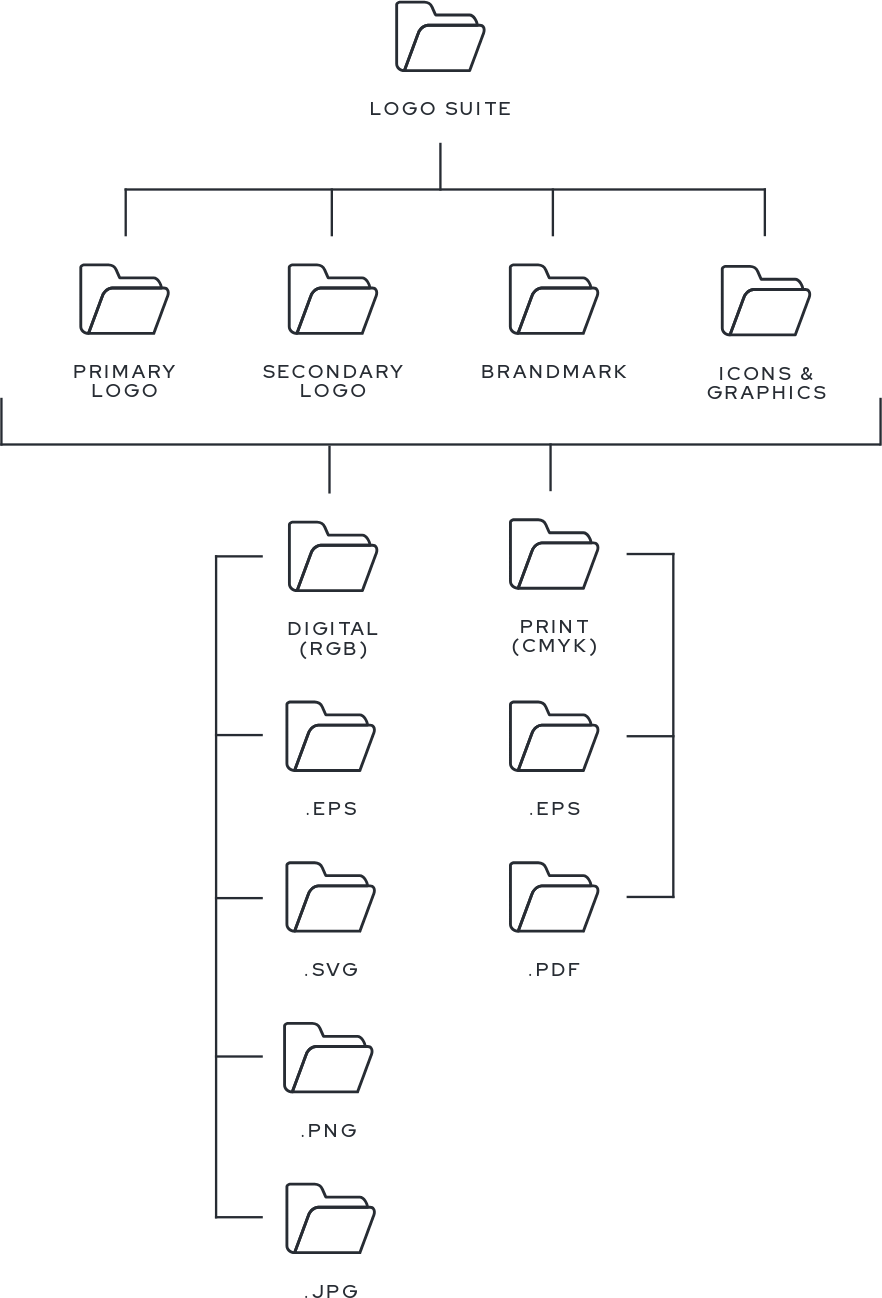
If you've made it this far and your brain is still trying to remember the difference between an EPS and an SVG, here's the simplified version of the logo formats I provide in my brand identity packages.
| File Format | Best For |
|---|---|
| RGB | Digital and screen-based applications |
| CMYK | Professional printing |
| EPS | Print suppliers, signage, and merchandise |
| SVG | Websites and scalable digital graphics |
| PNG | Social media, Canva, and transparent backgrounds |
| JPG | General-purpose images with solid backgrounds |
| An alternative vector format to EPS for printers |
And remember, RGB and CMYK describe how colours are represented, while EPS, SVG, PNG and JPG describe the actual file formats. EPS and PNG is usually both, while SVG and JPG are usually only provided in RGB.
Now that we’ve covered all the colour and file formats of your logos, there’s no excuse for you to ever use the wrong one. We should never see a pixelated or ill-fitting version of your logo anywhere ever again!
I know it’s a lot to take in, but I promise I've given you each of these different file formats for a reason.
Your logo is one of the most recognisable elements of your brand, and using the right format helps ensure it looks exactly how it's supposed to – whether it's sitting in the corner of your Instagram post or plastered across a giant billboard.
And if you're ever unsure which file to send to a supplier, just ask them what format they prefer. While understanding your logo files is helpful, you absolutely do not need to memorise every acronym to put your beautiful new branding to good use.
If you’d like to learn more about building your new brand identity with me, you can book in a free consultation with me here.
You may also like


There’s no one logo file format that works perfectly for everything, and while you don’t need to be an expert on them all, understanding the basics will save you a lot of confusion (and potentially money). So I’m breaking it down to help you put your logos to best use.